


Last week my system was affected by Mallicious Iframe in all html, php files...
I removed by following steps and posted here...
To remove Iframe virus in (HTML,PHP,ASP,..) files
step1: start->Run type "taskmgr" without quotes.
Step2: Use Task Manager to terminate the worm process (it may be called "spoclsv.exe").
step3: open winrar.exe ...select drive icon in bottom-left corner select c:
there will be setup.exe and autorun.inf
delete this files...

step4: Repeat above step to delete virus in all drives ..
Note:Virus will be hidden and folder option to change hidden files will be corrupted..
step5: Delete the following parameters from the system registry .
[HKCU\Software\Microsoft\Windows\CurrentVersion\Run]
"Svcshare" = "%System%\drivers\spoclsv.exe"
[HKLM\Software\Microsoft\Windows\CurrentVersion\Run]
"Svcshare" = "%System%\drivers\spoclsv.exe"
Note:type "regedit" in Run utility..HKCU(HKEY_CURRENT_USER),HKLM(HKEY_LOCAL_MACHINE)
step6:
Delete the following file:
C:/WINDOWS/system32/drivers/spoclsv.exe
step7: Download and install Ravmon Removal.exe to restore settings
step8: Restart..and download and install Antivirus kaspersky trial..
Read more
I removed by following steps and posted here...
To remove Iframe virus in (HTML,PHP,ASP,..) files
step1: start->Run type "taskmgr" without quotes.
Step2: Use Task Manager to terminate the worm process (it may be called "spoclsv.exe").
step3: open winrar.exe ...select drive icon in bottom-left corner select c:
there will be setup.exe and autorun.inf
delete this files...
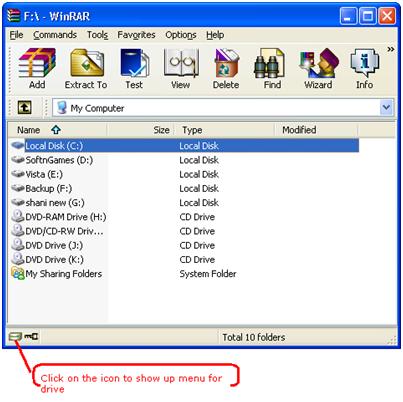
step4: Repeat above step to delete virus in all drives ..
Note:Virus will be hidden and folder option to change hidden files will be corrupted..
step5: Delete the following parameters from the system registry .
[HKCU\Software\Microsoft\Windows\CurrentVersion\Run]
"Svcshare" = "%System%\drivers\spoclsv.exe"
[HKLM\Software\Microsoft\Windows\CurrentVersion\Run]
"Svcshare" = "%System%\drivers\spoclsv.exe"
Note:type "regedit" in Run utility..HKCU(HKEY_CURRENT_USER),HKLM(HKEY_LOCAL_MACHINE)
step6:
Delete the following file:
C:/WINDOWS/system32/drivers/spoclsv.exe
step7: Download and install Ravmon Removal.exe to restore settings
step8: Restart..and download and install Antivirus kaspersky trial..

